What was done
Show which workflow steps were completed and what closeout status each step supports.
A proof packet is a structured field closeout record with job context, completed steps, photos, timestamps, notes, exceptions, signoff, reviewer status, and closeout summary.
CoSkip adds AI-guided field execution and proof capture around existing workflows and systems, so supervisors, customers, warranty teams, and auditors can review what happened without rebuilding the job from scattered evidence.
A proof packet is a structured closeout record that shows what happened on a field job, which steps were completed, what evidence was captured, what exceptions were found, who signed off, and what information reviewers need after the work is done.
A proof packet is different from a folder of photos because it connects evidence to workflow steps and review needs. The packet explains why the evidence matters, not just that a photo or note exists.
When that same context needs to support quoting or recommendation follow-up, the field sales AI packet shows how closeout proof can become a cleaner post-visit packet without replacing sales or field judgment.
Show which workflow steps were completed and what closeout status each step supports.
Keep timestamps attached to field evidence so reviewers can understand the sequence.
Attach technician notes, crew context, or signoff to the work performed.
Preserve condition notes, readings, material details, issue descriptions, and field context.
Connect photos, before/after evidence, checklists, notes, and signoff to the right step.
Make exceptions, open items, supervisor review, and customer handoff easier to understand.
Field teams often capture evidence, but it is scattered across camera rolls, text threads, job notes, PDFs, FSM records, and emails. Proof packets bring the evidence, workflow context, and review path into one structured closeout record.
A photo without the related step, asset, note, or requirement can still leave reviewers guessing.
Supervisors lose time chasing photos, readings, or signatures that should have been captured during the job.
Managers need a clear record, not a reconstruction effort across texts, forms, and calls.
Customers need a closeout story that explains completed work, captured proof, exceptions, and next steps.
Warranty teams need step-level evidence, before/after proof, parts notes, and signoff in a reviewable packet.
Operations leaders need to see where proof gaps repeat so workflow requirements can improve.
A CoSkip proof packet organizes field evidence by workflow step so reviewers can see what happened, what proof supports it, what exceptions remain, and what record is ready to export or review.
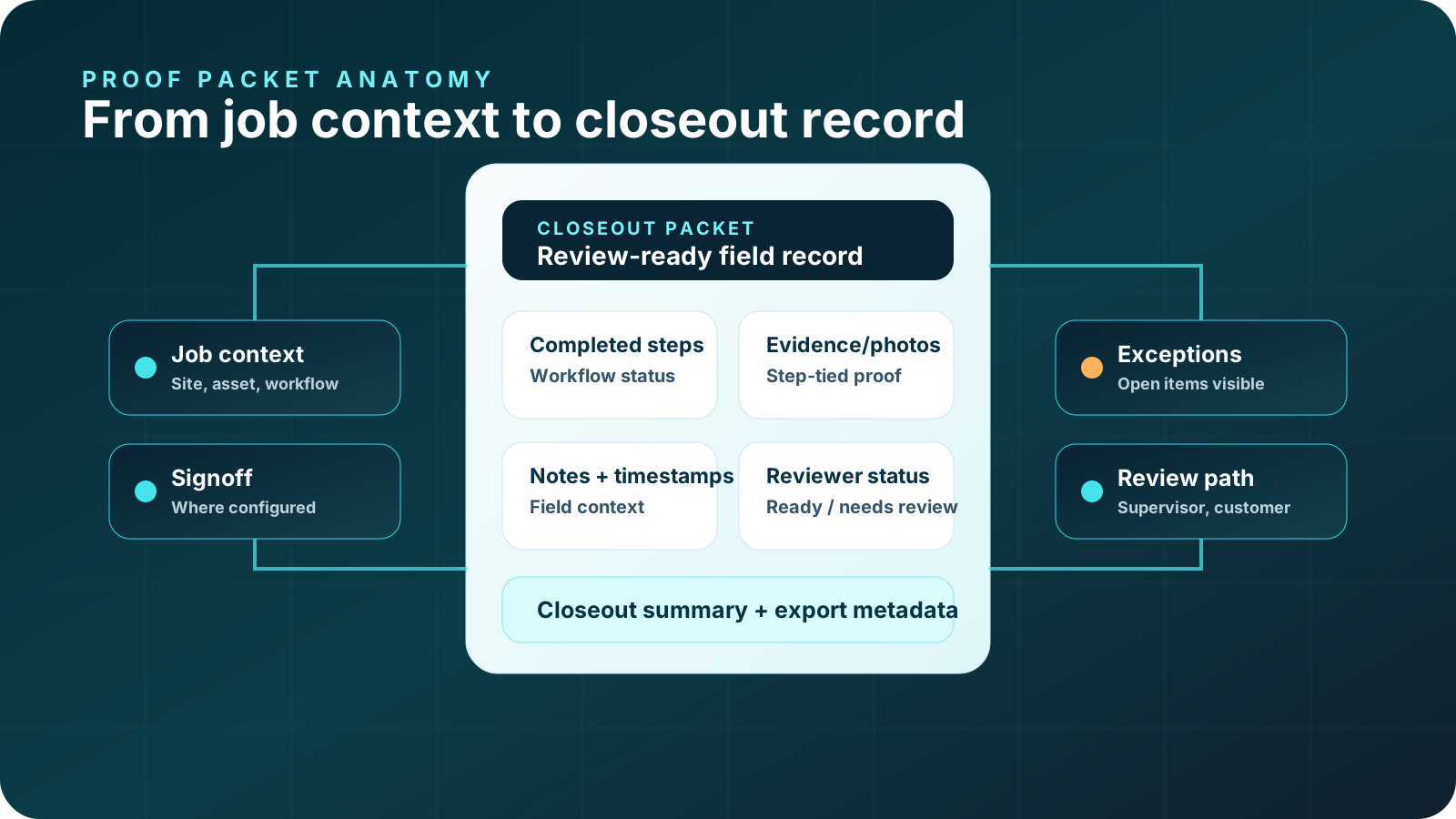
Proof packets are strongest when proof is captured at the source. CoSkip helps the workflow guide the technician, collect the required proof, and assemble the record as the work progresses.
Teams can use proof-of-work readiness to decide whether one workflow has clear source material, required proof, reviewers, systems, and ownership before building the packet structure.
Choose a workflow where missing proof creates supervisor review, customer closeout, warranty, or audit friction.
Prompt the right job steps, required evidence, exception paths, and closeout requirements.
Attach photos, timestamps, notes, readings, and signoff to the step where they happen.
Make open items, skipped proof, and follow-up needs visible before review gets harder.
Turn guided work and step-level evidence into a structured closeout record for reviewers.
A job proof packet should make the completed work easier to review for every stakeholder who needs confidence after the technician leaves the site.
Technicians get clearer guidance on required photos, notes, readings, exceptions, and closeout steps.
Supervisors can review step-tied proof, notes, exceptions, and signoff in a structured record.
Customers can see what was completed, what proof was captured, and what follow-up remains.
Warranty teams can review before/after evidence, parts notes, service steps, exceptions, and signoff.
Auditors and compliance reviewers can review step-level proof, notes, and metadata in one packet.
Operations leaders can identify recurring missing evidence, unclear steps, and workflow friction.
Different field workflows need different proof. CoSkip helps define the proof requirements and connect evidence to the workflow where it belongs.
Capture PM steps, equipment condition, required photos, technician notes, exceptions, and closeout signoff.
HVAC proof packets →Capture inspection checks, safety issues, contractor verification, equipment-room notes, exceptions, and supervisor review status.
Facilities proof packets →Capture before-and-after evidence, parts notes, service steps, exceptions, signoff, and claim-ready proof.
See the warranty repair evidence chain →Capture issue evidence, repair action, after proof, customer signoff, and closeout notes.
Plumbing proof packets →Document inspection proof, blockage notes, approval steps, hydro-jetting closeout, and customer review context.
Sewer and drain proof packets →Record safety checks, photos, readings, issue notes, and signoff for electrical service work.
Electrical proof packets →Capture roof area documentation, damage photos, measurements, material notes, repair proof, and customer-ready packets.
Roofing proof packets →Guide inspections, safety checks, contractor review, notes, exceptions, and supervisor-ready proof packets.
Utility proof packets →Basic documentation captures assets. A proof packet keeps the workflow context that makes field evidence reviewable.
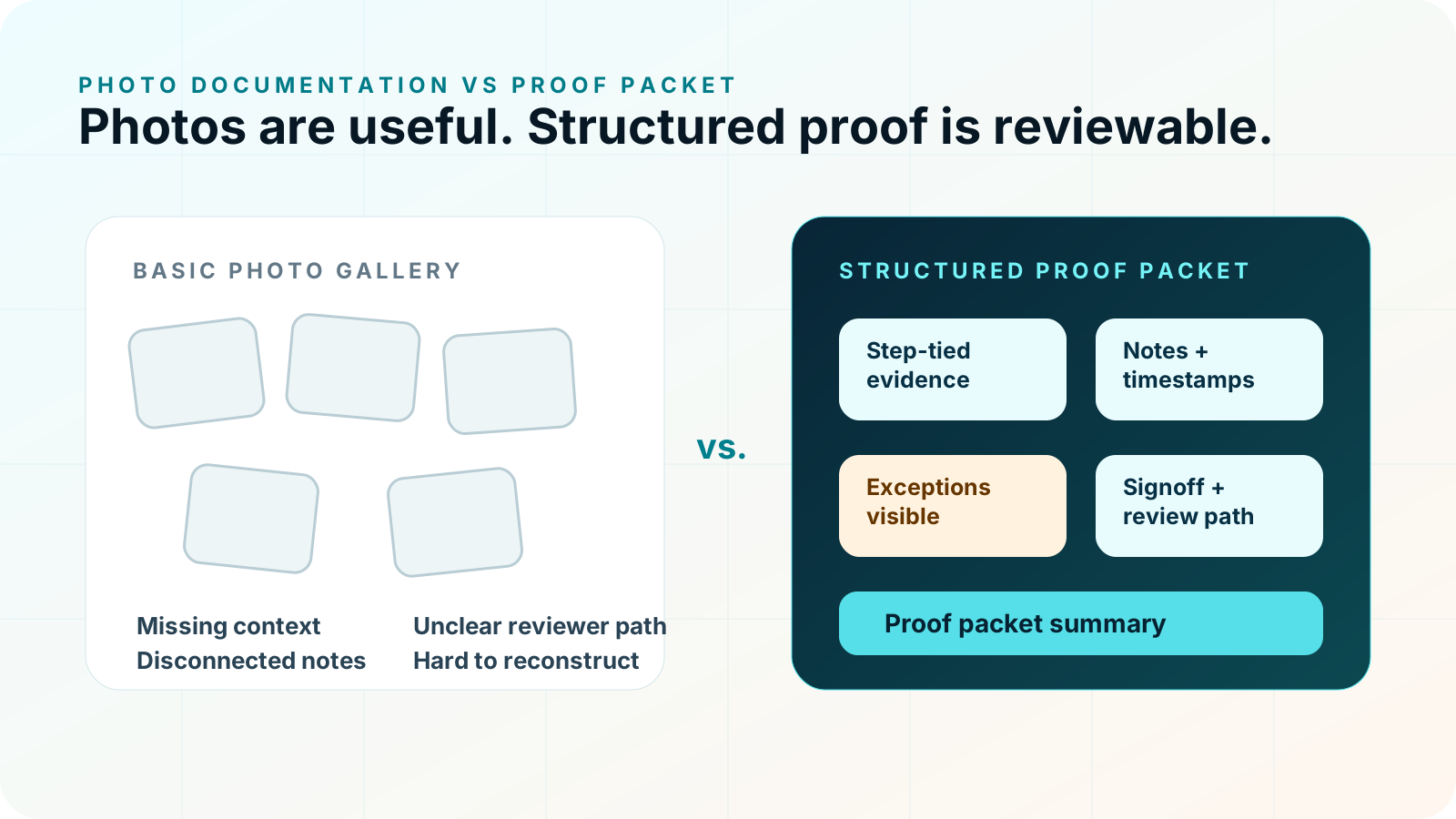
Proof-of-work is the broader operational need: showing that field work was done correctly, with the evidence reviewers require. A proof packet is the structured record that makes that proof reviewable.
CoSkip helps teams guide the work and assemble the proof packet while the job happens, instead of rebuilding the story afterward.
Proof packets can support exports, review workflows, and system-of-record processes depending on pilot scope. CoSkip can support integration planning around APIs, webhooks, and export-ready records when appropriate.
Security, privacy, and data handling matter when field evidence includes customer sites, assets, technicians, and job details. Integration scope depends on your workflow, existing systems, pilot goals, and security requirements.
Proof packets are especially useful for HVAC workflows where closeout, warranty review, callbacks, and repeat-visit analysis depend on clear evidence.
Connect photos, timestamps, notes, exceptions, and signoff to HVAC workflow steps.
HVAC proof of work →Organize before-and-after evidence, parts notes, and review-ready warranty records.
HVAC warranty documentation →Turn maintenance steps and required proof into a review-ready closeout packet.
HVAC PM closeout →Organize panel photos, safety checks, closeout steps, exceptions, and signoff for electrical review.
Electrical proof of work →Collect inspection evidence, storm damage documentation, measurements, notes, and closeout proof.
Roofing proof of work →Proof packets are strongest when photo documentation, closeout requirements, proof templates, and warranty records are planned together.
Review the packet anatomy: job context, steps, photos, timestamps, notes, exceptions, signoff, and closeout summary.
Read the proof packet guide →Understand how proof records become review-ready packets for supervisors, customers, warranty teams, and auditors.
Read the proof-of-work guide →See why proof packets need photos plus step context, notes, timestamps, exceptions, and review status.
Compare proof and photos →See how guided steps, proof prompts, exceptions, and closeout support can create better proof packets.
Read technician assistant guide →Plan the field adoption path that makes proof capture useful during the job instead of after the fact.
Read adoption checklist →Capture photos with step context, timestamps, notes, exceptions, and signoff.
Explore photo documentation →Guide closeout steps and create review-ready job records.
Explore close-out software →Define the required steps, proof, exceptions, signoff, and reviewer summary before a pilot.
View proof template →Capture warranty repair evidence, parts notes, service steps, exceptions, and proof packets.
Explore warranty proof →Learn how packets organize job context, service steps, photos, timestamps, notes, exceptions, signoff, and reviewer status.
Read warranty packet guide →Review what proof field teams should capture during warranty-related workflows.
Read warranty proof guide →Use the warranty checklist to plan before/after proof, service steps, parts notes, exceptions, and signoff.
Read checklist guide →Organize warranty evidence into claim-ready review records.
Explore warranty claim documentation software →Turn repair photos, technician notes, exceptions, signoff, and closeout status into review-ready plumbing proof.
Plumbing proof of work →Organize camera inspection evidence, blockage proof, service actions, approvals, and customer-ready closeout.
Sewer and drain proof →The best way to start is not to redesign every field process. Start with one workflow where missing proof creates pain, then test whether guided work and proof capture improve the closeout record.
Choose the service, inspection, repair, or closeout workflow where proof gaps are costly.
Map what technicians need to do, what reviewers need, and where exceptions appear.
Specify photos, readings, notes, signoff, timestamps, and metadata requirements.
Run the workflow with a small field team and clear operational owner.
Evaluate packet completeness, supervisor review friction, technician feedback, and expansion fit.
Practical answers for teams evaluating field service proof packets, proof-of-work records, and review-ready closeout.
A proof packet is a structured closeout record that shows what happened on a field job, which steps were completed, what evidence was captured, what exceptions were found, who signed off, and what reviewers need after the work is done.
A field service proof packet can include job details, workflow steps, photos, timestamps, technician notes, exception details, customer or technician signoff, supervisor review status, and export-ready metadata.
Photo documentation captures images. A proof packet connects evidence to workflow steps, required proof, exception status, timestamps, notes, and the review path after the job.
Proof packets can support supervisors, customers, warranty teams, auditors, compliance reviewers, administrators, and operations leaders who need a clear record of what happened.
Yes. A warranty proof packet can organize before and after evidence, parts notes, repair steps, exceptions, signoff, and closeout context for review.
Yes. Proof packets can give customers a clearer closeout record showing completed steps, captured evidence, exception status, and any next steps.
No. CoSkip adds AI-guided field execution and proof capture around existing workflows and systems. Integration or export scope depends on pilot goals and system requirements.
CoSkip guides the technician through required workflow steps, captures proof as the work happens, flags exceptions or missing evidence, and organizes the result into a review-ready proof packet.
Start with one repeatable workflow where missing proof creates supervisor review delays, customer disputes, warranty friction, callbacks, compliance review work, or closeout confusion.
CoSkip can support export-ready records and integration planning depending on workflow, pilot goals, current systems, and security requirements.
Start with one repeatable workflow and see how guided work, proof capture, and closeout records can improve review quality.