
Use this checklist to plan technician adoption for field service AI with workflow fit, training, devices, proof prompts, supervisor review, and pilot metrics.
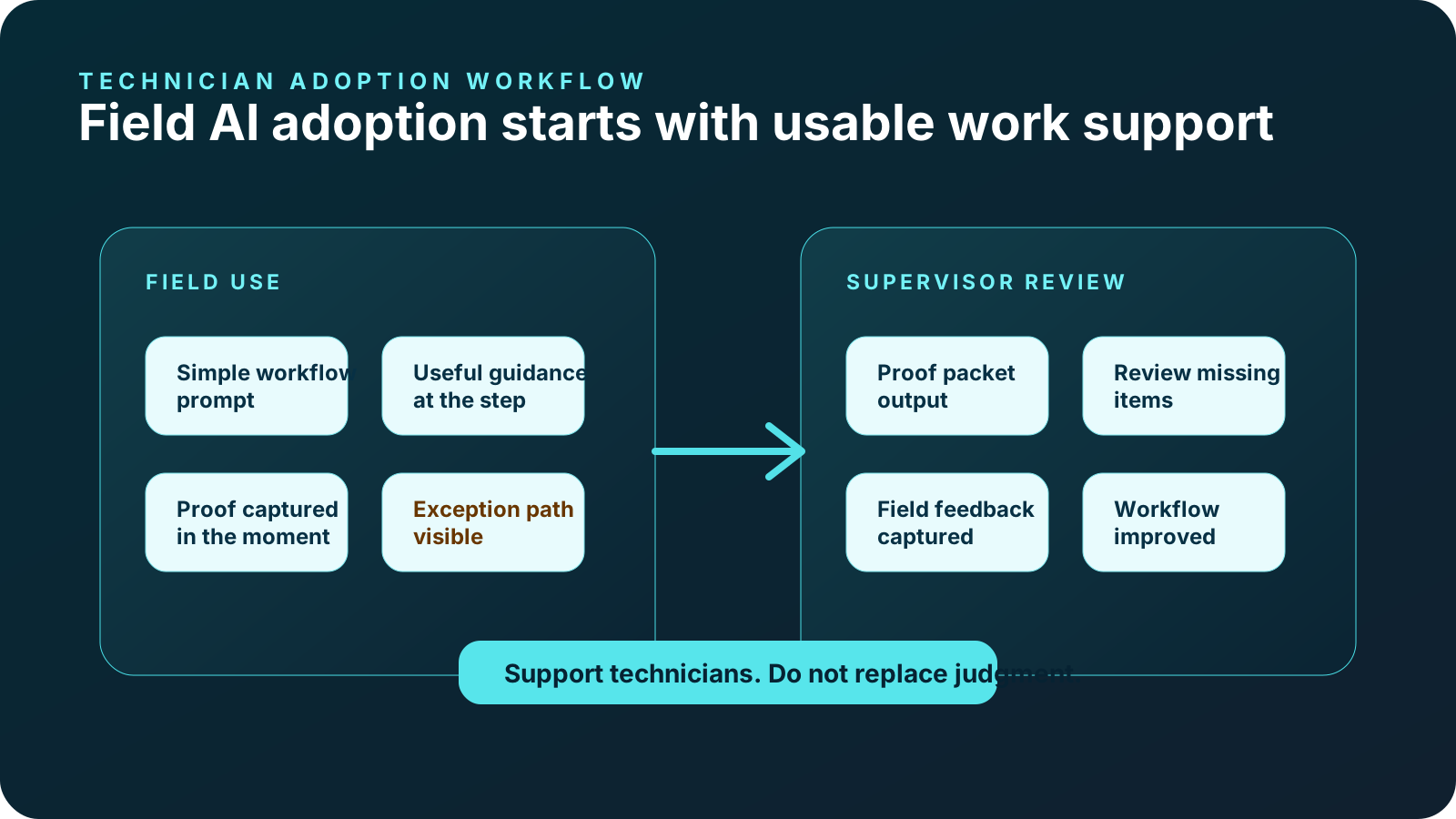
Technician adoption for field service AI works best when the tool helps technicians during the job, starts with one repeatable workflow, prompts proof at the right time, and gives supervisors a better closeout record.
Adoption fails when AI feels like surveillance, extra paperwork, generic chat, unreliable answers, or a tool built for managers instead of field work. Use the checklist below to plan workflow fit, field usability, source trust, training, feedback, proof capture, and pilot metrics.
CoSkip supports configured field workflows, proof capture, exception visibility, and review-ready closeout. It does not replace technicians, professional judgment, safety procedures, licensing, formal training, manufacturer guidance, supervisor review, field service management systems, warranty systems, legal review, or compliance programs. Pilot outcomes depend on workflow scope, adoption, available source material, system fit, and operating conditions.
Technician adoption checklist
Use this checklist before rollout and again after the first pilot review. The goal is to make field AI practical enough that technicians see how it helps the job, not only how it helps management reporting.
- 1Choose one workflow technicians recognize
Start with a PM closeout, inspection, warranty repair, customer handoff, or proof-heavy workflow technicians already perform.
- 2Explain the technician benefit
Show how guidance reduces guessing, makes proof expectations clearer, and prevents follow-up calls after closeout.
- 3Keep prompts short
Mobile field prompts should be concise, readable, and tied to the current step.
- 4Use approved source context
Where configured, make it clear which SOPs, checklists, manuals, or expert notes inform guidance.
- 5Prompt proof at the source
Ask for photos, readings, notes, timestamps, or signoff while the technician is already performing the step.
- 6Make exceptions safe to flag
Technicians should be able to mark missing proof, unresolved conditions, access blockers, or customer questions without hiding the issue.
- 7Involve field leads early
Technician leads should review prompts, language, proof requirements, and field usability before rollout.
- 8Close the feedback loop
Show technicians what changed because of their feedback and how proof packets are reviewed.
- 9Measure adoption and proof quality
Track usage, proof completeness, exception visibility, technician feedback, and review friction without promising guaranteed results.
Common adoption failure points
Most field AI adoption problems are not AI model problems. They are workflow design problems. The tool asks too much, at the wrong time, with vague value, using context technicians do not trust. Fixing those basics is usually more important than adding more features.
Too broad at launch
Trying to cover every workflow creates generic guidance and unclear measurement.
Manager-first language
Technicians resist tools that feel designed only for oversight or administrative reporting.
Untrusted answers
If source scope is unclear, technicians will not know whether to trust the guidance.
Proof prompts too late
Asking for proof after the job recreates the same reconstruction problem.
No exception path
Technicians need a clean way to show blockers, missing information, and follow-up needs.
No field feedback loop
If feedback disappears, technicians assume the tool will not improve.
Designing for technician trust
Trust comes from relevance, clarity, and respect for field reality. A technician should know why the prompt appears, what source context it reflects where configured, what proof is required, and what happens with the record after closeout. Avoid positioning AI as a judge of technician skill. Position it as a support layer for repeatable work and review-ready proof.
Connect the tool to fewer follow-up calls, clearer review, better customer handoff, or warranty documentation.
Identify source materials or configured process knowledge so technicians understand the context.
Use short prompts, large touch targets, and step-specific proof requirements.
Do not imply AI replaces technician judgment, safety procedures, licensing, or supervisor review.
Let technicians see how proof packets reduce after-the-fact questions or improve review clarity.
Refine prompts, proof requirements, and exception paths based on field feedback.
Supervisor and operations checklist
Adoption is not only a technician responsibility. Supervisors and operations leaders need to set expectations, review proof packets consistently, and avoid punishing useful exception reporting. Otherwise technicians learn to close out quickly instead of accurately.
- Define what proof completeness means for the selected workflow.
- Agree which exceptions should stop closeout and which should route to follow-up.
- Review the first proof packets with field leads, not only office stakeholders.
- Separate pilot feedback from performance discipline during early testing.
- Measure where prompts helped and where they slowed technicians down.
- Update source materials when technicians identify gaps or outdated instructions.
- Clarify what data moves into FSM, CRM, CMMS, warranty, document, or reporting systems.
Field service examples
PM closeout
A technician sees the next PM step, captures equipment condition proof, records a reading, flags exceptions, and creates a review-ready closeout packet.
Explore HVAC PM closeoutRepair documentation
The workflow prompts before condition, repair action, after proof, technician rationale, and warranty-ready review context.
Explore warranty repairRecurring inspection
A field lead follows recurring checks, captures location proof, flags issue status, and gives supervisors a clear record.
Explore facilities inspectionPanel inspection
Configured prompts can support panel photos, readings, safety-sensitive notes, exception status, and closeout review.
Explore electrical proofExterior documentation
Crews can document roof area evidence, storm damage context, measurements, material notes, and customer-ready closeout.
Explore roofing and exteriorsAsset inspection
Contractor or technician proof stays tied to the asset, inspection step, exception path, and review queue.
Explore utility asset inspectionAdoption metrics to review
Do not measure only usage. A technician can click through a tool and still produce weak proof. Use a balanced set of indicators: adoption, proof quality, exception quality, supervisor review, technician feedback, and customer or warranty closeout needs where relevant.
| Signal | What to review | Why it matters |
|---|---|---|
| Usage | How often the workflow is started, completed, skipped, or abandoned. | Shows whether technicians can use it in real field conditions. |
| Proof completeness | Required photos, notes, readings, signoff, and timestamps captured. | Shows whether the workflow improves review readiness. |
| Exception quality | Open issues, missing proof, blocked steps, or follow-up needs captured clearly. | Shows whether field reality is visible instead of hidden. |
| Review friction | Supervisor follow-up, manual reconstruction, and packet clarity. | Shows whether the record is useful after the job. |
| Technician feedback | Prompt clarity, timing, device usability, and perceived value. | Shows whether the pilot is built for field use. |
Check whether your field workflow is ready for adoption.
Use the readiness score and technician assistant page to scope one workflow before asking field teams to change their process.
Technician adoption FAQs
What is the biggest factor in technician adoption?
Workflow fit. Technicians are more likely to adopt field AI when it helps with a real step, proof requirement, or closeout problem they already experience.
Should we launch field AI across every workflow?
No. Start with one repeatable, proof-heavy workflow so guidance, source context, and proof requirements can be specific.
How do we avoid making AI feel like extra paperwork?
Prompt proof during the work, keep interactions short, explain the technician value, and show how the proof packet reduces follow-up questions.
Should technicians help design the workflow?
Yes. Field leads should review prompts, proof requirements, device flow, exception paths, and language before broader rollout.
What if technicians do not trust the answers?
Clarify source scope, use approved materials where configured, avoid unsupported technical claims, and provide a supervisor path for uncertain situations.
How should we measure adoption?
Track usage, proof completeness, exception visibility, review friction, technician feedback, and workflow-specific outcomes without promising guaranteed results.
Does CoSkip replace training?
No. CoSkip supports configured workflow guidance and proof capture. It does not replace formal training, certification, licensing, or safety programs.
What should be prepared before adoption testing?
Prepare one workflow, source materials, proof requirements, sample jobs, field leads, pilot owner, device assumptions, and review path.
