
An AI technician assistant helps field technicians follow guided steps, get workflow-specific answers, capture proof, flag exceptions, and close out jobs.
An AI technician assistant helps field technicians complete repeatable work by surfacing configured guidance, prompting required proof, flagging exceptions, and turning the job into a review-ready closeout record.
It is not an autonomous technician, a generic chatbot, or a replacement for training, safety procedures, professional judgment, or supervisor review. The best version supports the field moment: what step the technician is on, what proof is required, what context is approved for the workflow, and what reviewers need after the job.
CoSkip supports configured field workflows, proof capture, exception visibility, and review-ready closeout. It does not replace technicians, professional judgment, safety procedures, licensing, formal training, manufacturer guidance, supervisor review, field service management systems, warranty systems, legal review, or compliance programs. Pilot outcomes depend on workflow scope, adoption, available source material, system fit, and operating conditions.
Why field teams are evaluating AI technician assistants now
Most service organizations already have dispatch software, work orders, knowledge documents, photos, and experienced technicians. The problem is that the field moment is still fragile. A technician may need to remember a site-specific note, find a procedure, capture the correct photo, record a reading, ask a supervisor a workflow question, and close the job with proof that will make sense later.
An AI technician assistant can help when the company has repeatable workflows and a clear idea of what good closeout evidence looks like. Instead of giving the technician a blank note field or a generic chat box, the assistant can guide the job around configured workflow steps, source-aware answers where configured, required proof, exception paths, and closeout status.
Less guessing during the job
The assistant should make the next step, proof requirement, and exception path easier to understand in the moment.
Cleaner review after the job
Completed steps, proof, notes, timestamps, and exceptions can be organized into a record instead of reconstructed later.
Better workflow signal
Teams can see where guidance helps, where proof is missing, and where the workflow itself needs redesign.
How an AI technician assistant works
The operating model is simple: choose one repeatable workflow, configure the guidance and proof requirements, support the technician during the job, and produce a proof packet that reviewers can inspect. The assistant should not invent technical repair instructions. It should work from approved process context and the configured workflow scope.
- 1Start from one workflow
Pick a PM closeout, warranty repair, inspection, customer handoff, safety check, or other repeatable job where review quality matters.
- 2Load approved context
Use SOPs, checklists, manuals, job notes, site instructions, or expert process knowledge where the pilot supports it.
- 3Guide the next step
Show technicians concise prompts tied to the current workflow step, not a long policy document.
- 4Prompt required proof
Ask for photos, timestamps, readings, notes, signoff, or other evidence while the work is happening.
- 5Flag exceptions
Keep unresolved issues, missing proof, blockers, customer questions, or follow-up needs visible.
- 6Create closeout record
Organize the steps, evidence, notes, exceptions, and reviewer context into a proof packet.
Before, during, and after the job
Operations defines the target workflow, available sources, proof checklist, reviewer needs, and pilot success criteria.
The assistant supports step-by-step execution, source-aware answers where configured, proof capture, and exception status.
The proof packet gives supervisors, customers, warranty teams, or auditors a cleaner record to inspect.
AI technician assistant vs. chatbot
A chatbot can respond to a prompt. A technician assistant should understand the workflow context. That distinction matters because field work is not just question answering. It includes job steps, required proof, device constraints, technician trust, supervisor review, and closeout documentation.
| Capability | Generic chatbot | AI technician assistant |
|---|---|---|
| Primary experience | Open-ended chat | Guided job steps and workflow-specific support |
| Answers | General response to a question | Source-aware guidance from approved context where configured |
| Proof | Optional uploads or notes | Required proof prompts tied to the step |
| Exceptions | May stay in freeform text | Visible status for blocked, missing, or follow-up items |
| Closeout | Transcript or summary | Review-ready proof packet with steps, proof, notes, and reviewer context |
What it can help technicians do
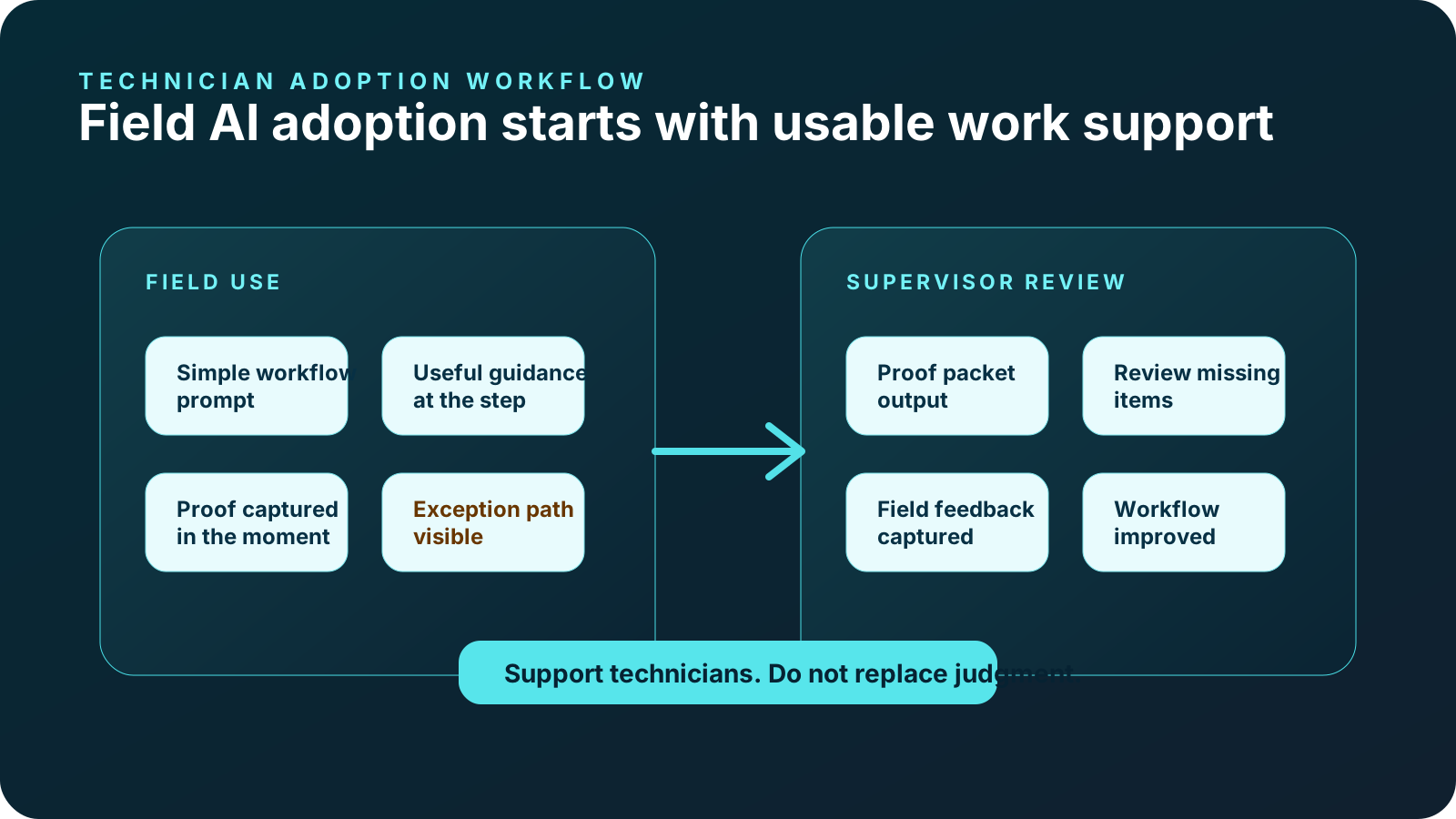
A useful assistant should feel like a practical field support layer. It can help technicians see the next step, ask workflow-specific questions, capture required evidence, clarify what is missing, and close out with confidence. It should reduce ambiguity without adding a separate administrative burden.
Follow configured workflows
Support repeatable work paths such as PM closeout, inspection documentation, warranty repair, or customer handoff.
Use approved context where configured
Surface relevant SOP, checklist, manual, site note, or expert process context within pilot scope.
Capture evidence at the source
Prompt photos, timestamps, notes, readings, measurements, and signoff while the technician is still on site.
Make unresolved items visible
Flag missing proof, open issues, customer questions, access blockers, or follow-up needs before closeout.
Build a proof packet
Turn guided work into a record supervisors, customers, warranty reviewers, or auditors can inspect.
Give field teams a useful tool
Keep prompts short, context relevant, and feedback loops visible so technicians see the value.
Field service examples
PM closeout
A technician sees the next PM step, captures equipment condition proof, records a reading, flags exceptions, and creates a review-ready closeout packet.
Explore HVAC PM closeoutRepair documentation
The workflow prompts before condition, repair action, after proof, technician rationale, and warranty-ready review context.
Explore warranty repairRecurring inspection
A field lead follows recurring checks, captures location proof, flags issue status, and gives supervisors a clear record.
Explore facilities inspectionPanel inspection
Configured prompts can support panel photos, readings, safety-sensitive notes, exception status, and closeout review.
Explore electrical proofExterior documentation
Crews can document roof area evidence, storm damage context, measurements, material notes, and customer-ready closeout.
Explore roofing and exteriorsAsset inspection
Contractor or technician proof stays tied to the asset, inspection step, exception path, and review queue.
Explore utility asset inspectionHow to pilot an AI technician assistant
The best pilot is not an enterprise-wide rollout. Start with one workflow that is frequent, proof-heavy, and hard to review after the job. Gather sample jobs, define required evidence, align field leads, and choose a small technician group. Then measure adoption, proof quality, exception visibility, and closeout friction.
Readiness signals to check before rollout
The process happens often enough that templates, prompts, proof requirements, and exception paths are worth configuring.
SOPs, checklists, job notes, manuals, or expert process knowledge are available where the pilot will use them.
Supervisors, warranty teams, customers, or quality reviewers can identify required photos, notes, readings, signoff, or exceptions.
The field experience fits device use, connectivity, PPE, job timing, and technician attention during the task.
Someone can make tradeoffs, gather feedback, resolve blockers, and decide whether to refine, expand, or pause.
The team knows where the proof packet, export, or summary must go after the job.
Start with one technician workflow before expanding.
Use the interactive demo, readiness score, or pilot program to decide whether one workflow is ready for guided field work with proof built in.
AI technician assistant FAQs
What is an AI technician assistant?
An AI technician assistant helps field technicians follow configured workflows, get workflow-specific guidance, capture required proof, flag exceptions, and close out jobs with review-ready records.
Does an AI technician assistant replace technicians?
No. It supports technicians during repeatable work. It does not replace skill, judgment, safety procedures, licensing, training, or supervisor review.
How is it different from a chatbot?
A chatbot answers open-ended prompts. A technician assistant should be tied to workflow steps, approved context, proof requirements, exception status, and closeout records.
Can it answer job-specific questions?
Where configured, it can surface workflow-specific guidance from approved SOPs, checklists, manuals, job notes, site context, or expert process knowledge.
What proof can it help capture?
Depending on pilot scope, it can prompt photos, timestamps, notes, readings, measurements, exception details, signoff, and closeout summaries.
Does it replace our FSM or CMMS?
No. CoSkip supports guided execution and proof capture around existing systems. Export and integration scope depend on pilot goals.
What workflow should we pilot first?
Choose one repeatable, proof-heavy workflow where missed steps, missing evidence, or slow review create operational friction.
How do we prepare technicians?
Involve field leads early, keep prompts short, explain why proof matters, collect feedback, and measure whether the workflow helps during the job.
