
Pilot field service AI on one repeatable workflow by defining steps, proof, users, systems, success metrics, and review paths before rollout.
Pilot field service AI on one workflow by choosing a repeatable, proof-heavy process; defining steps, required proof, source context, technician users, review owners, systems, and success metrics; then testing with a focused field group.
Do not start with every workflow, every branch, every technician, and every integration. A one-workflow pilot creates a clean learning loop: guide the work, capture proof, flag exceptions, assemble closeout records, review adoption, and decide whether to refine, expand, or pause.
CoSkip supports configured field workflows, proof capture, exception visibility, and review-ready closeout. It does not replace technicians, professional judgment, safety procedures, licensing, formal training, manufacturer guidance, supervisor review, field service management systems, warranty systems, legal review, or compliance programs. Pilot outcomes depend on workflow scope, adoption, available source material, system fit, and operating conditions.
Why one workflow is the best starting point
Field service AI becomes vague when it tries to serve every use case at once. A technician assistant for PM closeout needs different proof than a warranty repair workflow. A facilities inspection needs different exception paths than a roofing storm documentation workflow. A one-workflow pilot lets the team define what good looks like and measure whether guidance and proof capture actually help.
The goal is not to prove AI in the abstract. The goal is to learn whether one real workflow can be guided, proven, closed out, and reviewed better than the current process.
Specific prompts
One workflow makes guidance practical instead of generic.
Clear evidence standard
The team can define exactly which photos, notes, readings, signoff, and exceptions matter.
Smaller field group
A focused technician group can test usability and feedback quickly.
Known reviewers
Supervisors, warranty, customers, or quality teams can inspect the output against a specific need.
Controlled handoff
Export, integration, or system-of-record needs can be scoped after the record is understood.
Cleaner go/no-go
The team can decide whether to expand, refine, or pause based on evidence.
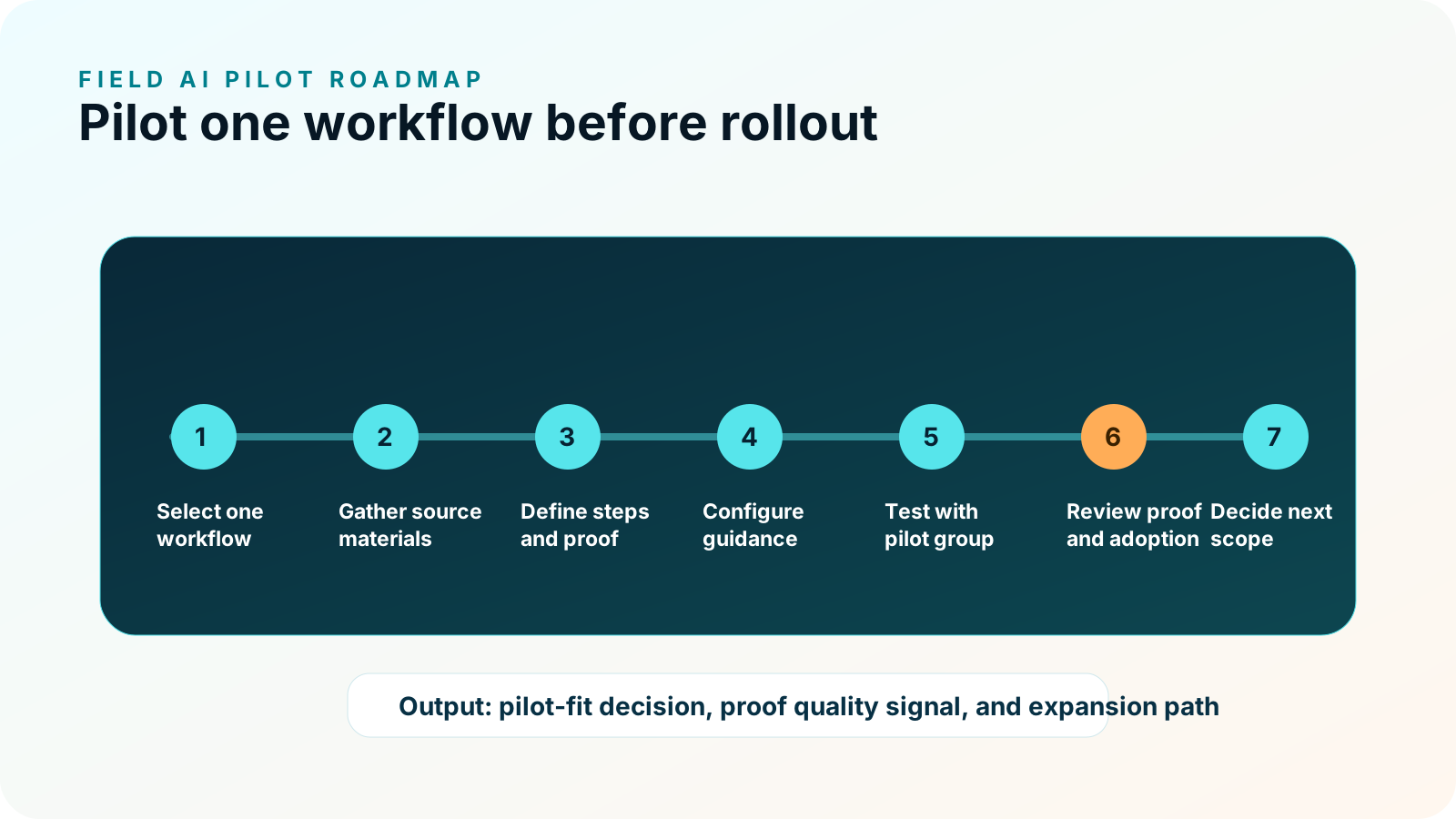
One-workflow pilot plan
- 1Pick the workflow
Choose a repeatable job where proof gaps, closeout friction, warranty review, callbacks, customer handoff, or supervisor review matter.
- 2Define the current process
Document what technicians do today, what systems they touch, what gets skipped, and where review breaks down.
- 3Gather source materials
Collect SOPs, checklists, manuals, job notes, customer handoff rules, warranty requirements, or expert process knowledge.
- 4Map required proof
Identify required photos, timestamps, notes, readings, measurements, signoff, and exception details.
- 5Define reviewer needs
Clarify who reviews the packet and what they need to decide after the job.
- 6Select technician group
Start with field leads and technicians who can give practical feedback without overrepresenting one edge case.
- 7Configure guidance
Turn the workflow into short prompts, proof requirements, exception paths, and closeout outputs.
- 8Run the pilot
Test in live or controlled field conditions, depending on risk and operational constraints.
- 9Review results
Measure adoption, proof completeness, exception visibility, supervisor review, technician feedback, and business-case signals.
- 10Decide next step
Refine the workflow, expand to more teams, add integrations, or pause if fit is weak.
What not to do
Many AI pilots fail because they start too big, too abstract, or too disconnected from field reality. Avoid these patterns.
Launching every workflow
Broad pilots create generic prompts, unclear proof standards, and weak accountability.
Testing only chat prompts
Field AI should be evaluated against job steps, proof capture, exceptions, and closeout records.
Skipping technician feedback
Field leads need to review language, timing, device flow, and practical usefulness.
Ignoring proof requirements
Without proof standards, the pilot cannot show whether review quality improved.
Forcing integrations first
Start by understanding the proof packet and workflow record, then scope system handoffs.
Promising guaranteed outcomes
Measure specific signals instead of guaranteeing adoption, ROI, callback reduction, or approval.
Readiness signals to check before rollout
The process happens often enough that templates, prompts, proof requirements, and exception paths are worth configuring.
SOPs, checklists, job notes, manuals, or expert process knowledge are available where the pilot will use them.
Supervisors, warranty teams, customers, or quality reviewers can identify required photos, notes, readings, signoff, or exceptions.
The field experience fits device use, connectivity, PPE, job timing, and technician attention during the task.
Someone can make tradeoffs, gather feedback, resolve blockers, and decide whether to refine, expand, or pause.
The team knows where the proof packet, export, or summary must go after the job.
Pilot success metrics
| Metric area | Example signal | How to use it |
|---|---|---|
| Adoption | Workflow starts, completions, skips, and technician feedback. | Decide whether the field experience fits real work. |
| Proof quality | Required photos, notes, readings, signoff, and timestamps captured. | Evaluate whether reviewers get a better record. |
| Exception visibility | Open issues, missing proof, blockers, and follow-up paths surfaced. | Understand whether field reality is captured honestly. |
| Closeout review | Supervisor follow-up, manual reconstruction, and packet clarity. | Measure review friction without claiming guaranteed time savings. |
| Business case | Callbacks, warranty friction, customer disputes, or rework drivers where relevant. | Build an ROI model from observed workflow signals. |
Field service examples
PM closeout
A technician sees the next PM step, captures equipment condition proof, records a reading, flags exceptions, and creates a review-ready closeout packet.
Explore HVAC PM closeoutRepair documentation
The workflow prompts before condition, repair action, after proof, technician rationale, and warranty-ready review context.
Explore warranty repairRecurring inspection
A field lead follows recurring checks, captures location proof, flags issue status, and gives supervisors a clear record.
Explore facilities inspectionPanel inspection
Configured prompts can support panel photos, readings, safety-sensitive notes, exception status, and closeout review.
Explore electrical proofExterior documentation
Crews can document roof area evidence, storm damage context, measurements, material notes, and customer-ready closeout.
Explore roofing and exteriorsAsset inspection
Contractor or technician proof stays tied to the asset, inspection step, exception path, and review queue.
Explore utility asset inspectionPlan a focused Field AI pilot on one workflow.
Use CoSkip readiness, ROI, and pilot resources to decide whether one proof-heavy workflow is ready for guided work with proof built in.
Field service AI pilot FAQs
Why pilot field service AI on one workflow?
One workflow keeps guidance specific, proof requirements clear, technician feedback actionable, and pilot measurement easier to interpret.
What workflow is best for a first pilot?
Choose a repeatable, proof-heavy workflow where missing evidence, slow review, callbacks, warranty friction, or customer handoff problems matter.
How long should a pilot take?
CoSkip often frames pilots around a focused 6-10 week path, but scope depends on workflow complexity, field availability, and review needs.
Do we need integrations before piloting?
Not always. Many teams can start with proof packets and exports, then scope API, webhook, FSM, CRM, CMMS, or document-system handoffs later.
Who should be involved?
Include an operations owner, field lead, supervisor or reviewer, IT/security contact, and a focused technician group.
What should we measure?
Measure adoption, proof completeness, exception visibility, supervisor review, technician feedback, and workflow-specific business-case signals.
Can a pilot guarantee ROI?
No. A pilot can produce evidence for a business case, but it should not be described as guaranteeing ROI, adoption, or callback reduction.
What happens after the pilot?
The team can refine the workflow, expand to related workflows, scope integrations, or pause if fit is weak.
