
A field service proof packet should include job context, completed steps, photos, timestamps, notes, exceptions, signoff, and closeout summary.
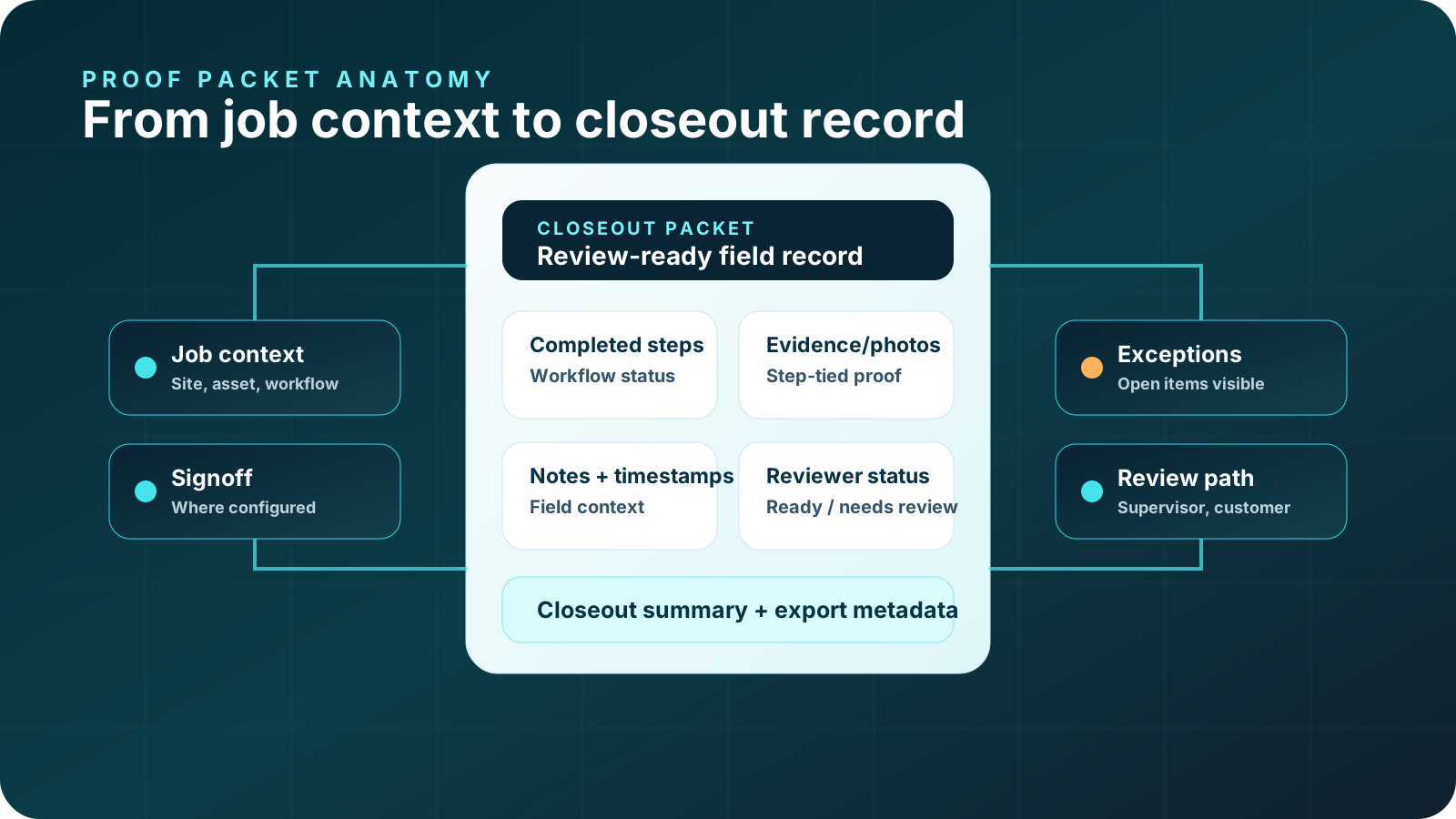
A field service proof packet should include job context, completed workflow steps, required photos, timestamps, technician notes, exceptions, signoff where configured, reviewer status, and a closeout summary.
The packet should make a field job understandable after the work is complete. A supervisor, customer, warranty team, quality reviewer, auditor, or operations leader should be able to see what happened, what proof supports it, what remains open, and what action is expected next.
Why proof packet structure matters
A proof packet is not just a larger report. If it is poorly structured, it can become another place where evidence gets buried. A good packet organizes proof by workflow and reviewer need. That makes it easier to inspect required evidence, identify missing items, understand exceptions, and hand off the record to another stakeholder.
Structure matters because field service proof is usually used under time pressure. Supervisors need to close jobs. Customers want a clear explanation. Warranty teams need supporting evidence. Operations leaders need patterns. A packet that forces everyone to search through uploads, notes, and messages recreates the problem it was supposed to solve.
Proof packet anatomy
Work order, site, customer, asset, crew, contractor, workflow, and system reference.
Steps completed, skipped, blocked, escalated, or left open.
Photos, readings, measurements, timestamps, part notes, material notes, and signoff.
Condition, rationale, constraint, action, customer note, or field observation.
Missing proof, unresolved condition, blocked access, customer question, or follow-up need.
Supervisor-ready, customer-ready, warranty-ready, export-ready, or needs review.
Job context section
The job context section tells the reviewer what record they are looking at. It should include enough information to connect the packet back to the job, asset, customer, workflow, and system of record without exposing unnecessary or sensitive details.
- Work order or job reference where configured.
- Customer, site, location, asset, equipment, or area context.
- Technician, crew, subcontractor, contractor, or field lead context.
- Workflow name, checklist name, or service type.
- System handoff metadata where configured.
Workflow steps section
The workflow steps section shows what was supposed to happen and what actually happened. It should not simply say "completed." It should show the steps that matter for review and make blocked, skipped, or escalated steps visible.
| Step status | What it means | What reviewers need |
|---|---|---|
| Completed | The step was performed and required proof was captured. | Evidence, timestamp, and any relevant note. |
| Blocked | The step could not be completed. | Reason, field note, and follow-up owner. |
| Skipped | The step did not apply or was not performed. | Reason and approval or review path where configured. |
| Exception | The step surfaced an issue. | Issue details, evidence, and next action. |
Evidence and photo section
The evidence section should include photos, readings, measurements, timestamps, signoff, material notes, part notes, and other proof items required by the workflow. Evidence should be tied to steps, not just listed as a gallery. A reviewer should be able to tell which proof item supports which part of the job.
Before photo, condition note, asset or area reference, and timestamp.
Photo, reading, material note, part note, measurement, or technician observation.
After photo, signoff where configured, exception status, and review-ready summary.
Technician notes section
Technician notes should explain context that photos cannot. A good note is not a paragraph of generic description. It clarifies a condition, action, exception, constraint, rationale, customer interaction, or follow-up need. Where configured, guided prompts can make these notes more consistent without forcing technicians into overly rigid scripts.
Useful technician notes often answer: what was observed, what action was taken, why an exception exists, what proof was unavailable, what customer or site constraint mattered, and what the reviewer should look at next.
Exceptions and follow-up section
Exceptions are one of the most important parts of a proof packet. They prevent incomplete or risky work from disappearing behind a completed status. The packet should make exceptions obvious and actionable.
The packet should show the missing item, reason, and reviewer path.
Capture the access issue, site note, customer context, or follow-up owner.
Flag the issue, evidence, and expected next action.
Keep the question, response path, and closeout status visible.
Signoff and review section
Signoff should be used carefully. It can show acknowledgment where configured, but it should not imply approval, warranty acceptance, insurance approval, compliance certification, or legal determination unless that is truly what happened. In many cases, the safer and more useful language is review-ready, supervisor-ready, customer-ready, warranty-ready, export-ready, or needs review.
| Reviewer | What they usually need | Packet output |
|---|---|---|
| Supervisor | Completed steps, missing proof, exceptions, and next action. | Supervisor-ready closeout record. |
| Customer | Completed work, visible evidence, and open items in plain language. | Customer-ready closeout packet. |
| Warranty | Before condition, repair action, after proof, and technician rationale. | Warranty-ready evidence packet. |
| Operations | Patterns in missing proof, exceptions, and handoff quality. | Review trail and workflow improvement signal. |
| IT / systems | Export metadata and system-of-record handoff context. | Export-ready record where configured. |
Closeout summary section
The closeout summary should be short, specific, and reviewable. It should not restate every proof item. It should explain the completed workflow, important evidence, open issues, and next action. A good closeout summary can help a supervisor close the job, help a customer understand what happened, and help operations review patterns later.
- What workflow was completed.
- What required proof was captured.
- What exceptions or missing items remain.
- Who should review the record.
- What action is expected next.
Packet format and reviewer usability
The best proof packet format depends on who reviews the record and how it moves through the business. A supervisor may need a compact in-app view. A customer may need a clean shareable closeout summary. A warranty reviewer may need a more detailed evidence trail. IT or operations may need export-ready metadata. The same proof record can support different views if the underlying evidence is structured by workflow step.
Design the packet so the most important review information appears first. Job context, closeout status, missing proof, and exceptions should not be buried. Detailed photos and notes can follow. If the packet is too dense, reviewers will skim past the parts that matter. If the packet is too thin, they will ask the field team for context. The right format gives each reviewer enough information to decide the next action without turning the packet into a manual.
Make ready-for-review, missing proof, and open exceptions visible at the top.
Group photos, notes, readings, and timestamps under the workflow step they support.
Keep source context, reviewer path, and system handoff fields available where configured.
Proof packet examples by reviewer
Closeout packet
Step timeline, required proof, missing items, exception status, and ready-for-review summary.
Explore closeout softwareCustomer-ready packet
Plain-language summary, before/after evidence, completed work, and unresolved item clarity.
View sample packetWarranty-ready evidence
Before condition, repair action, after photo, technician rationale, part note, and review path.
Use warranty checklistWorkflow review packet
Proof gaps, exceptions, technician friction, review owners, and pilot-readiness signals.
Check readinessProof packet examples by workflow
Inspection closeout packet
Nameplate photo, condition proof, reading, inspection step, exception note, closeout summary.
HVAC proof packetsStorm documentation packet
Exterior area photos, damage evidence, measurements, material notes, review summary.
Storm documentationRepair proof packet
Before condition, repair action, after photo, technician rationale, warranty review path.
Warranty proofInspection record
Recurring check, contractor proof, safety note, exception, operations review.
Facilities inspectionCommon proof packet mistakes
Most weak proof packets fail for the same reasons: too much disconnected evidence, too little step context, unclear exceptions, or unsupported claims. The packet should help people review the work, not overwhelm them.
- Using a photo dump instead of a step-tied evidence record.
- Leaving before/after proof disconnected from the repair action.
- Hiding missing proof or unresolved exceptions.
- Using approval language that has not been earned or authorized.
- Including fake badges, fake certification language, or unsupported claims.
- Failing to name the reviewer or next action.
- Building a packet that is too long for supervisors or customers to use.
How CoSkip helps create proof packets
CoSkip helps teams guide repeatable field workflows, prompt required proof, capture exceptions, and assemble proof packets depending on pilot scope. The starting point is not a generic packet template. It is one proof-heavy workflow with clear steps, evidence requirements, exception paths, and reviewer needs.
CoSkip can help field teams capture proof during the work rather than reconstructing it afterward. The final packet can then support supervisor review, customer handoff, warranty-ready evidence, and system handoff where configured.
Review the sample proof packet or start with a packet template.
The sample shows the review experience. The template helps define what your first packet should include.
Field service proof packet FAQs
What should be included in a field service proof packet?
A proof packet should include job context, completed steps, photos, timestamps, notes, exceptions, signoff where configured, reviewer status, and closeout summary.
Is a proof packet only for customers?
No. Proof packets can support supervisors, customers, warranty teams, quality teams, auditors, operations leaders, and system-of-record handoff depending on workflow scope.
Can a proof packet include warranty evidence?
Yes. It can organize warranty-related evidence, but it does not guarantee warranty approval or replace warranty terms.
What is the difference between a proof packet and a checklist?
The checklist defines what proof should be captured. The proof packet is the completed closeout record after the work is done.
Should a proof packet include exceptions?
Yes. Exceptions are often the most important review item because they show missing proof, unresolved conditions, blocked steps, or follow-up needs.
Does CoSkip replace our FSM or CMMS?
No. CoSkip supports guided work and proof packets around existing workflows and systems. Integration or export scope depends on the pilot.
